If you're reading this because the 2027 leave year is on the horizon and the thought of rebuilding your spreadsheet again fills you with dread, you're not alone. Every autumn, a wave of UK businesses quietly decide this is the year they move their staff leave tracking off Excel, out of scattered email threads, and onto something built for the job.
Why switch your staff leave tracking for 2027
There's never a perfect day to change the system a business runs its leave on, but some days are considerably better than others. The run-up to a new leave year is one of them. If your current cycle ends in December or April, you have a natural point to lock the old year, carry over whatever's left, and start the new one on a system built for it, rather than switching mid-year and reconciling two sets of records at once.
There's also a harder deadline worth knowing about. Since April 2026, the Employment Rights Act 2025 has required UK employers to keep adequate leave and holiday pay records for six years, including for former employees, and that's a legal obligation rather than a nice-to-have. We covered what this means in detail in our guide to the new record-keeping rules. A spreadsheet that lives on one laptop, gets renamed every January, and has no audit trail is a difficult thing to defend if a Fair Work Agency inspector ever asks for six years of history.
Then there's the more familiar reason: the spreadsheet has started to creak. Formulas break when someone inserts a row in the wrong place, a new joiner on a part-time pattern needs a manual workaround, and nobody's quite sure which copy is the current one. None of that is a criticism of whoever built it. We spent twenty years building and selling Excel leave planners ourselves, and wrote about what that taught us in a separate piece: spreadsheets are genuinely good tools, just the wrong tool once a team outgrows them.
Simple Leave for 2027 staff leave tracking
Since launching in 2025, we've been talking to our customers a lot, and adding the features, bells and whistles they've actually asked for. The core product hasn't changed its focus (it's still just leave tracking, approvals, and reporting), but what's underneath that has filled out considerably.
| What you're probably doing today | What Simple Leave does instead |
|---|---|
| Typing a year of backdated leave into one request form at a time | Click-and-drag entry for whole blocks of leave at once, with Quick-Add |
| Working out carried-over leave by hand at year end | One click calculates and pre-fills it per policy, ready to review and save |
| Scrolling a list of requests to guess where cover is thin | A colour-coded Heatmap Report that flags clashes at a glance |
| Logging in just to check who's off next week | A Monday-morning digest emailed straight to managers |
| A spreadsheet with no audit trail if a record request ever lands | A standing record of every request, approval, and change |
| Trying to hide sensitive leave types such as sickness from everyone | Private leave types, visible only to the employee, their manager, and admins who choose to show them |
| Wrestling with Excel formulas to generate your reports | Built-in heatmap, individual, and group reports, no formulas involved |
| Struggling to add sub-codes to existing ones to cater for things such as TOIL or accrual | Add sub-policies for TOIL, accrual, or anything else, without touching a formula |
| Unable to break leave down into team-specific views | Filter the calendar and reports by team, not just by individual |
Reporting that shows you the whole picture
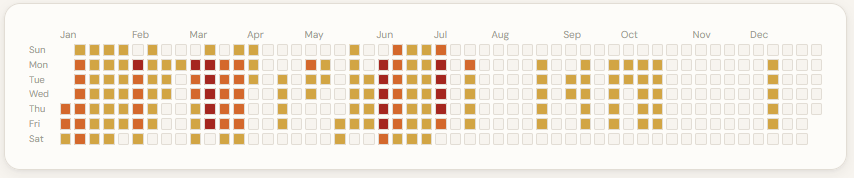
The Heatmap Report colours every day of a leave cycle from green through to red, based on what percentage of your selected employees are off. Click any day and you get a breakdown of exactly who's off and which leave category they're using, so a clash reads as "three people on annual leave together" rather than a vague warning. Administrators see it organisation-wide, managers see it for their own team, and the same view now sits on individual employee reports too, so you can spot the shape of one person's time off at a glance. We go into more depth on this in our heatmap reporting guide.
A calendar built for real teams, not just individuals
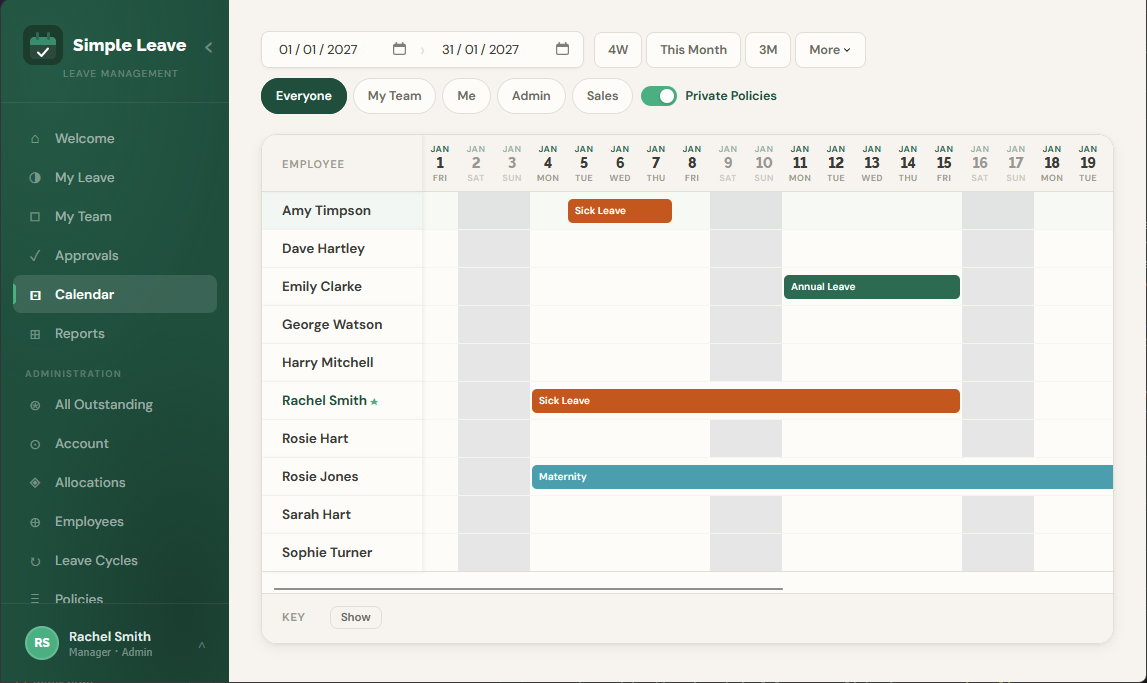
The shared calendar now remembers your last date range, team filter, and scroll position between visits, so switching to check a report and back doesn't mean resetting your view every time. It filters by team, by individual ("Me" and "My Team" views), and by leave category. Sensitive leave types (sickness, for instance) can be marked private: visible only to the employee, their manager, and administrators who choose to show it, while ordinary annual leave stays visible to the wider team by default. It's the difference between a calendar you can actually plan cover from and one that's just a list of coloured boxes.
Quick-Add: the fastest way to bring your history across
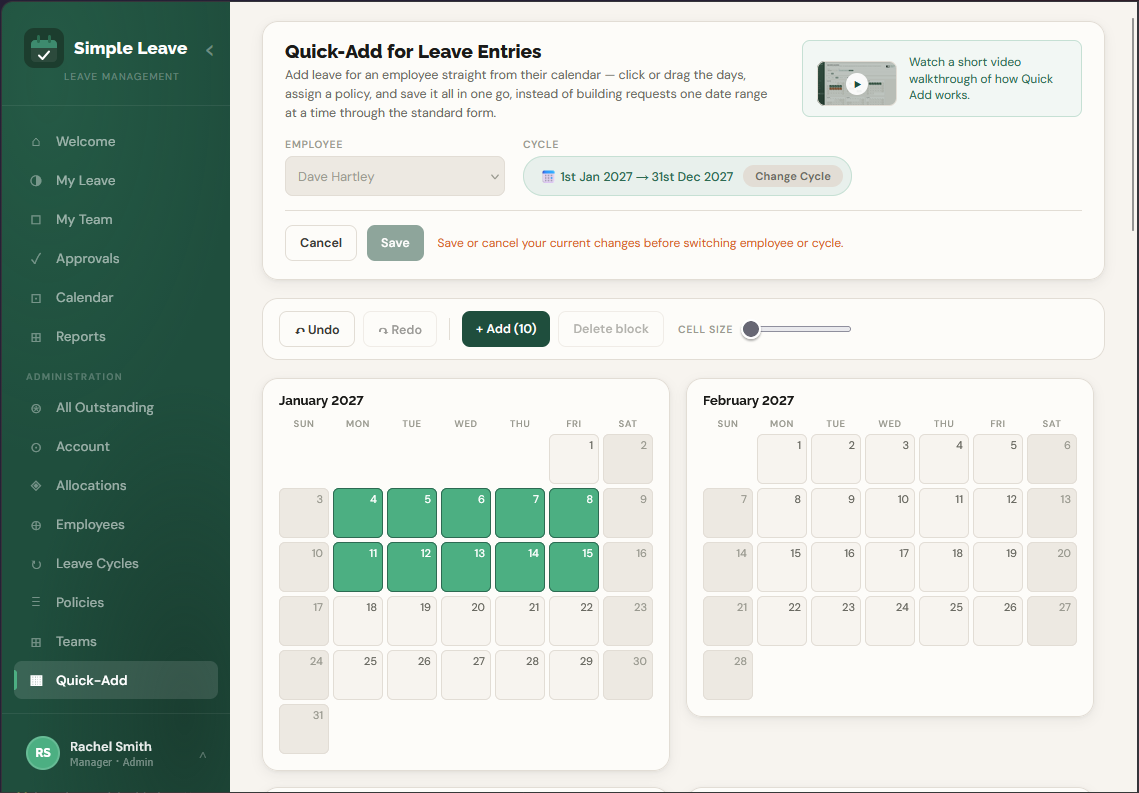
This is the feature that matters most if you're switching partway through a year. Quick-Add gives an administrator a calendar view of an employee's whole leave cycle: click or drag across the days, assign a leave policy to the block, repeat for as many blocks as needed, then save them all in one go. It was built specifically for getting a team's existing leave history into the system quickly when setting up, rather than raising dozens of individual requests one date range at a time. You'll find it under Administration → Quick-Add once your account is set up.
Rollover that doesn't need a calculator
Carrying unused leave into a new cycle used to mean working out each employee's remaining balance by hand. The Run Carry-Over Leave Process now does this automatically for a whole policy at once: pick the cycle you're carrying leave from, set an optional cap on days or hours, and it calculates every eligible employee's carried-over amount, pre-fills it against the new cycle, and lets you review and adjust before saving. Nothing commits until you click Save, and you can run it as many times as you like across cycles and policies. That repeatability is exactly what you want for a year-end switchover like this one.
A Monday-morning view of who's off
Managers can opt in to a weekly email summarising their team's approved leave for the days ahead, sent at 8am on whichever day suits them, covering anywhere from one day to two weeks. Private leave types are excluded automatically. It's a small thing, but it means staying on top of cover doesn't require logging in. The information comes to you instead.
One job, done properly
None of this turns Simple Leave into an all-in-one HR platform, and that's deliberate. It doesn't do payroll, onboarding, or performance reviews, and we have no plans to bolt those on. Staying narrow means the feature set above is comprehensive for the one job it's built for, at a price that doesn't need to subsidise modules you'll never open. For the full breakdown of how that stacks up across the market, including the HR suites that bundle leave tracking in almost as an afterthought, see our comparison of annual leave tracking tools for 2027.
What it costs to switch
There's no fee to move your data across, and the pricing itself hasn't changed: Simple Leave is free forever for up to 5 active employees, with every feature included: leave approvals, custom policies, the full reporting suite, and support. There's no time limit on that and no credit card required to start.
Beyond 5 active employees it's £0.60 per active employee per month inc. VAT. Your first 30 days are completely free, no credit card required to start, and there's no contract to sign, so there's no obligation and nothing to cancel if it's not for you. Ten employees costs £6 a month. Twenty costs £12. It's linear, and it includes everything: there's no higher tier you get upsold into once you've committed.
Why trust Simple Leave with the move
Simple Leave is a product of dhxsoft limited, who've spent over twenty years helping organisations track employee leave, first through Excel planners and now through this. The free plan isn't a stripped-down trial designed to expire. It's the full product, offered free because a business of five people shouldn't need to budget for leave software before it's ready to. We explain the thinking behind that properly in why Simple Leave has a free forever plan. If the economics of the free tier don't add up to you on paper, that's a fair question to ask, and we've tried to answer it honestly in that piece rather than just asserting it.
Making the switch without losing a day
In practice, the move looks something like this:
1. Set up your leave cycle and policies. Pick your leave year's start and end dates, add your working days and bank holidays, and define the leave categories you need: annual leave, sick leave, parental leave, or anything specific to your business. Most teams are through this in well under an hour.
2. Backdate this year's leave with Quick-Add. Rather than re-keying every request that's already happened, an administrator works through each employee's calendar, blocking out and assigning the leave that's already occurred so everyone's balance is correct from day one.
3. Get help with the bigger import if you need it. If you're moving a larger team and Quick-Add alone feels like a lot of clicking, Business plan customers get hands-on help importing their existing data instead.
4. Line it up with your leave year if you can, but don't wait if you can't. Switching right as a new cycle starts is the tidiest option: lock the old cycle once it ends and run the carry-over process to bring unused leave forward automatically. If your timing doesn't allow for that, none of it blocks a mid-year switch; it just takes a little more care reconciling whatever's already in progress.
The bottom line
None of this is about picking a fight with a spreadsheet, or with whatever tool you're on today. It's about recognising that staff leave tracking has a handful of annoying edge cases: part-time patterns, mid-year joiners, carried-over leave, who's actually off next Tuesday. Solving them once, properly, costs less in time and money than most teams expect. Simple Leave's free tier means you can find that out without spending anything, and the features above mean that if you do grow past it, you're not paying for a cut-down version to begin with.
Frequently asked questions
Is it hard to switch from Excel or another leave tracker to Simple Leave?
No. There's no integration to configure. You set up your leave policies and cycle, then use Quick-Add to enter your team's existing leave for the year in bulk, by clicking and dragging across a calendar rather than raising one request at a time. Business plan customers also get hands-on help importing their existing data.
Can I backdate leave that's already happened this year when I switch?
Yes. Quick-Add is designed for exactly this: an administrator picks an employee, selects the dates on a calendar grid, assigns the leave policy, and saves. It covers multiple employees and multiple leave types, so a year's worth of history can go in well before anyone needs to check a balance.
What does it cost to switch to Simple Leave?
Nothing to move your data across. Simple Leave itself is free forever for up to 5 active employees, with every feature included. Beyond that it's £0.60 per active employee per month inc. VAT, with your first 30 days completely free, no credit card required to start, and no contract.
When is the best time of year to switch staff leave tracking software?
Just before a new leave year starts is the cleanest point, since you can lock the old cycle, carry over any unused leave automatically, and begin the new year on the new system. That said, the carry-over and locking tools work at any point, so a mid-year switch isn't a blocker, it just takes slightly more care reconciling the year in progress.