Free download · No sign-up required

Free Excel
2027 Leave Tracker

One free spreadsheet to track annual leave, sickness, TOIL and more for up to 100 employees. National holidays shade themselves in, entries come from a dropdown, and every formula does the rest.

100 employees, out of the box
10 leave categories built in
No sign-up required
No macros needed

.xlsx file · Microsoft Excel · Free · No support provided
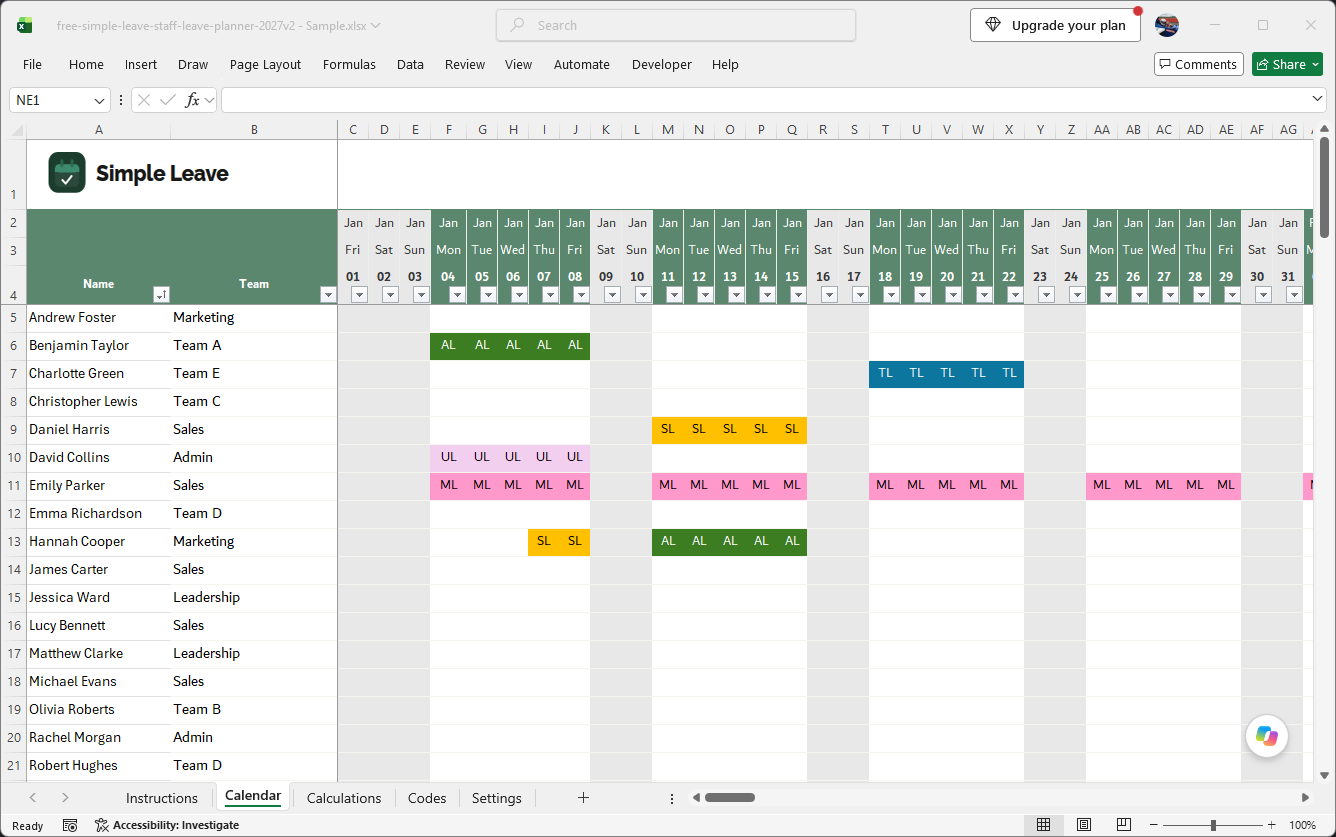
Free Excel 2027 leave tracker — monthly calendar showing colour-coded leave entries for a team
Features

What's in the free 2027 tracker

Everything needed to track a full leave year for up to 100 employees, in one spreadsheet.

100 EMPLOYEES

Room for your whole team

Every employee gets a row on the Calendar sheet, ready for teams up to 100 people. If you're happy editing formulas yourself, you can extend it further.

DEFAULT CATEGORIES

Every common leave type, built in

Annual Leave, Sick Leave, Maternity, Paternity, Compassionate Leave, Jury Service, Study/Training Leave, TOIL, Unpaid Leave and Volunteering Leave. All pre-loaded and colour-coded.

ONE DROPDOWN

Pick a code, everything else happens

Select from the dropdown and the calendar's colour, the Calculations totals and the days-remaining figure all update on their own — including national holidays, which shade themselves in.

NO FIXED CAP

Full days, half days, or no allowance at all

Fractional values live on the Codes sheet, and for 2027 you can switch off entitlement tracking entirely for categories that don't need a target.
Calendar sheet
Jan–Dec 2027
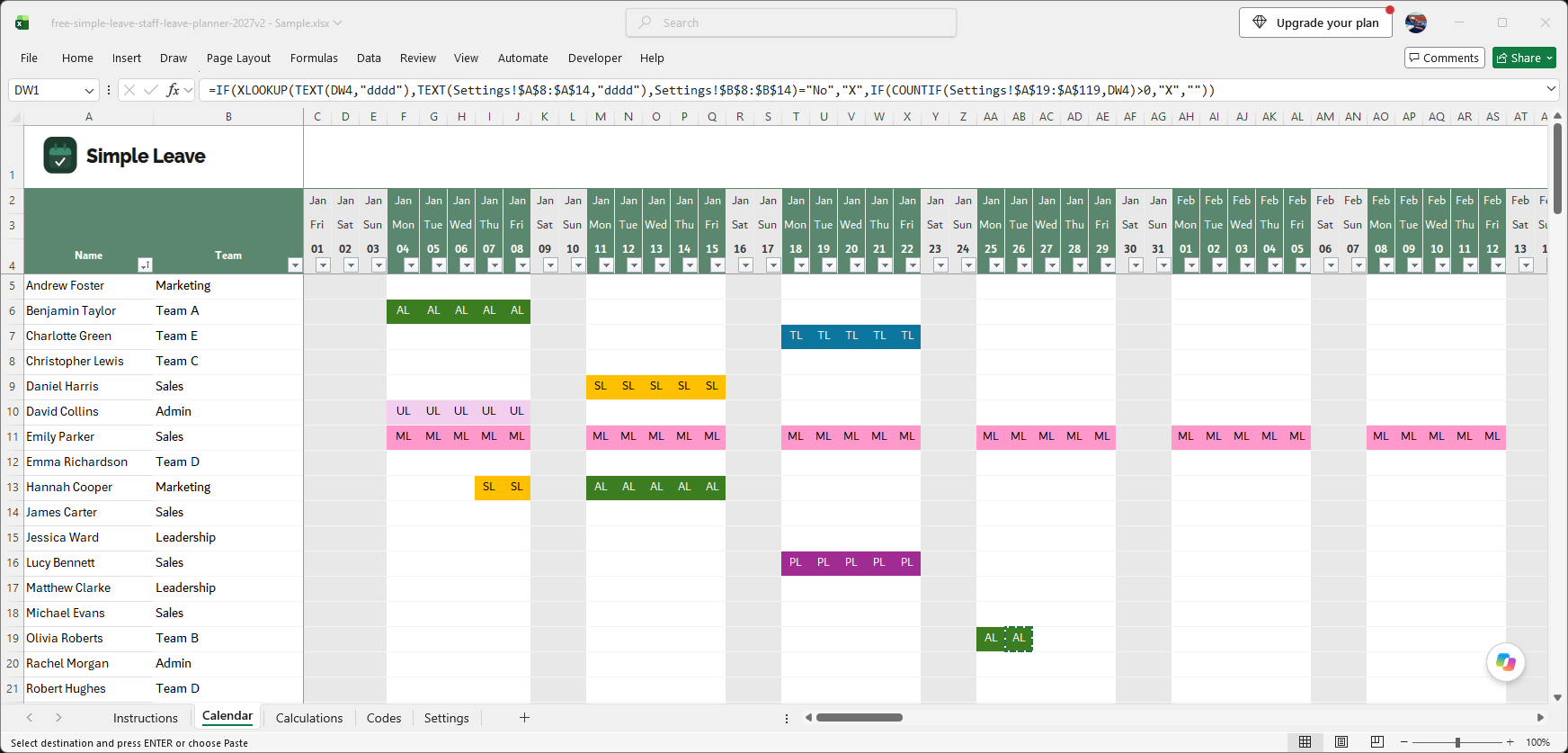
Free Excel 2027 leave tracker — Calendar sheet spanning January and February, showing colour-coded leave entries for a full team with weekends shaded
Calendar Sheet

Your whole team, one screen

This is where leave actually gets booked — and where it's easiest to spot a clash.

Every employee, every month

All 100 rows and all 12 months of 2027 live on one sheet, so there's no flicking between tabs to see who's off.

Colour tells the story

Each leave type keeps its Codes-sheet colour here, so a run of Annual Leave or a block of Sick Leave stands out across the whole team at a glance.

Weekends and holidays shade themselves

The sheet shades non-working days automatically and distinctly from leave entries, so it's obvious what's a day off versus what's booked leave.

The only place you'll touch conditional formatting

This is the one sheet in the workbook where colour comes from a conditional formatting rule rather than a formula.

New for 2027

Track leave without a fixed allowance

Some leave types were never meant to have a cap.

Not every category has a cap

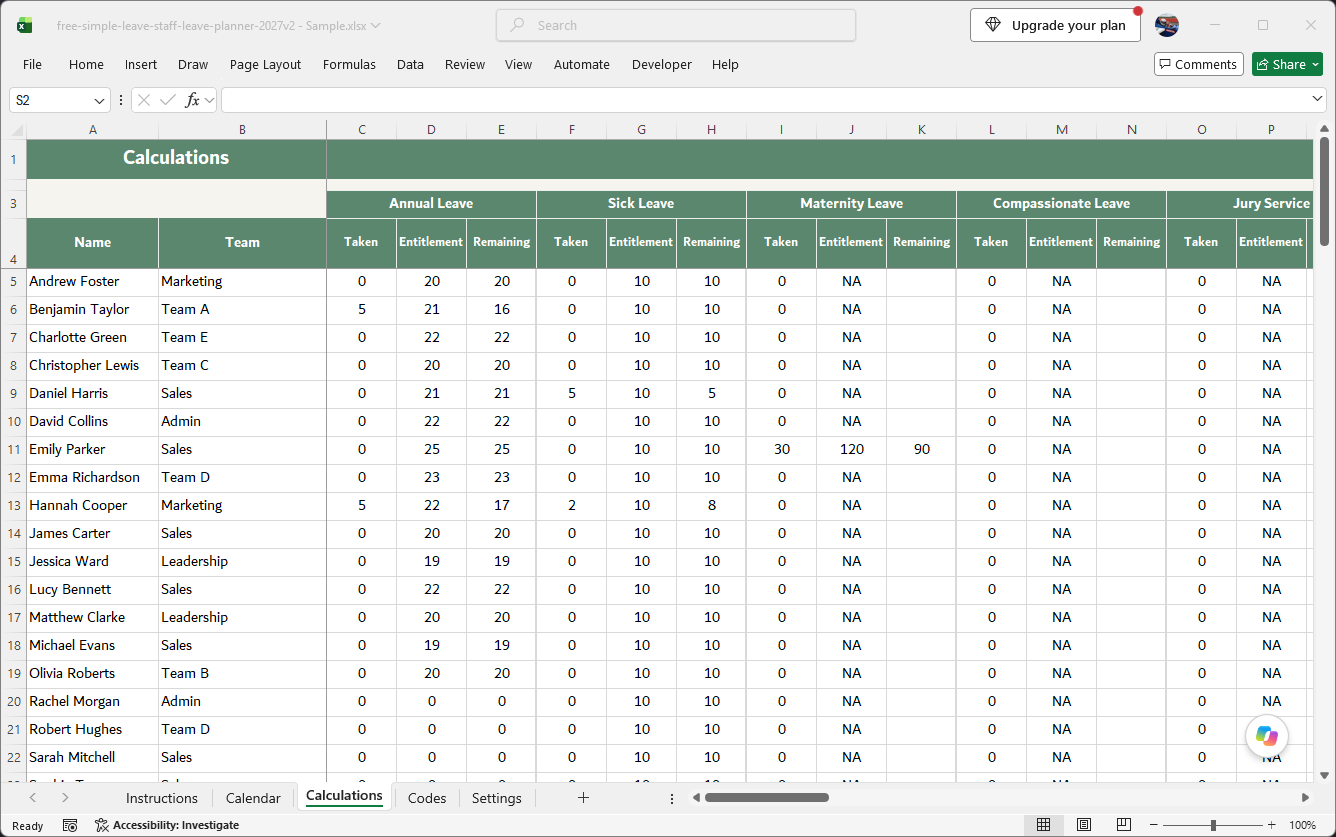
Jury Service, Compassionate Leave and TOIL are usually open-ended — there's nothing sensible to measure "days remaining" against.

Switch it off on the Calculations sheet

Opt any category out of entitlement tracking and the tracker simply counts days taken, with no target and no balance to maintain.
Calculations sheet
NEW
Free Excel 2027 leave tracker — Calculations sheet, entitlement column reads NA for Compassionate Leave and Jury Service
Codes sheet
10 types
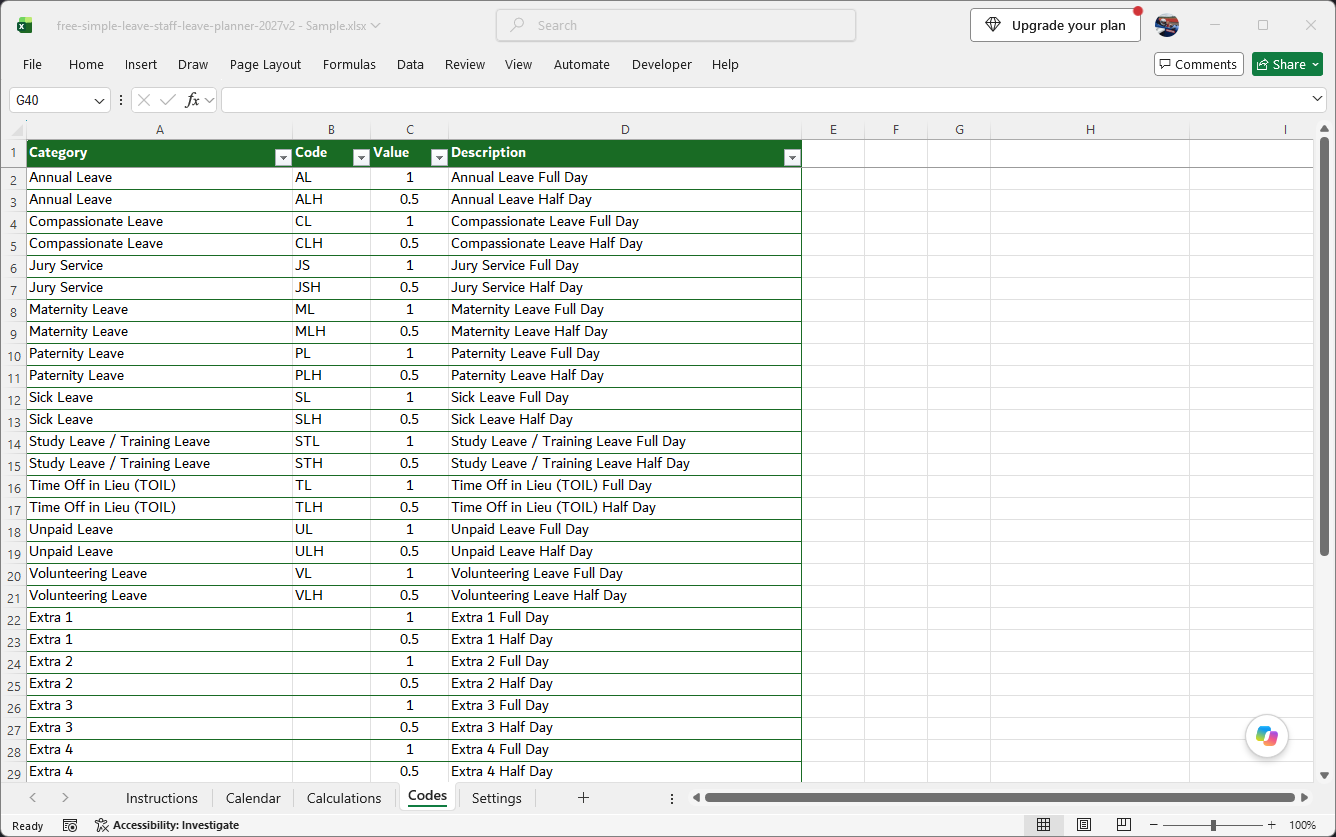
Free Excel 2027 leave tracker — Codes sheet listing all built-in leave categories with full-day and half-day values
Leave Categories

Every common leave type, ready on day one

No custom setup needed before you can start tracking.

10 built in, colour-coded

Annual Leave, Sick Leave, Maternity, Paternity, Compassionate Leave, Jury Service, Study/Training Leave, TOIL, Unpaid Leave and Volunteering Leave — each already coded and coloured.

10 more slots waiting

Add anything company-specific in the empty rows on the Codes sheet, and keep going beyond that if you need to.

Full day and half day, built into every code

Each category has a full-day and half-day pair from the start, so fractional leave never needs a workaround.

Settings & Customisation

Your working week, your bank holidays

Configured once, applied everywhere in the file.

Working days set once

Tell the Settings sheet which days count as working days and every calculation across the file respects it.

2027 bank holidays already loaded

England & Wales dates for 2027–2028 are pre-filled and shade themselves onto the calendar automatically.

Nothing else to configure

Your working week and bank holidays live entirely on this one sheet — set them once here and every other sheet in the workbook already knows about them.
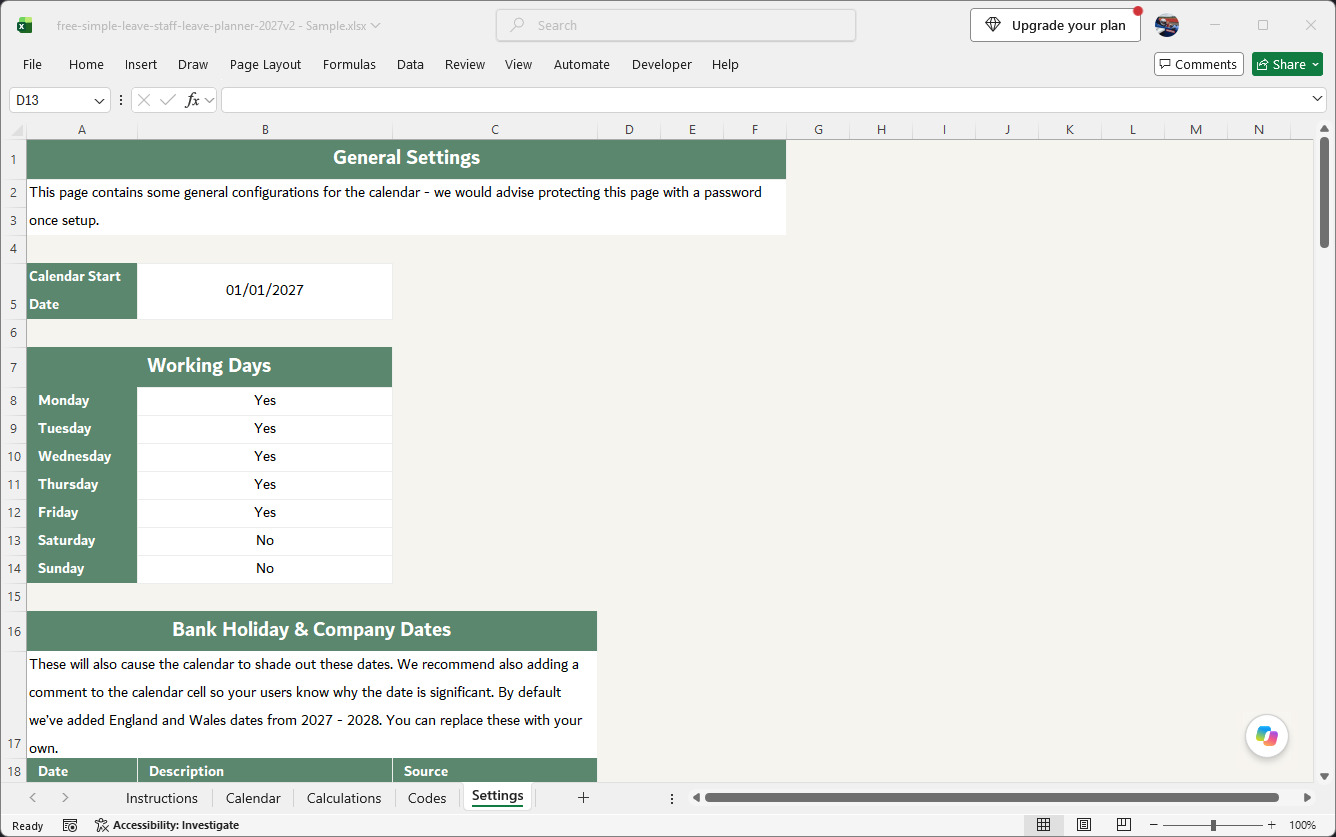
General Settings
2027–2028
Free Excel 2027 leave tracker — General Settings sheet showing working days and pre-loaded UK bank holidays

Download your free 2027 tracker

No sign-up. No email address. A free, ready-to-use Excel spreadsheet
with 2027 UK bank holidays already filled in.

Microsoft Excel (.xlsx) · Free · You will be asked to accept terms before downloading

This template is provided free of charge. No technical support is offered or implied.

FAQ

Frequently asked questions

Everything about the free 2027 tracker, in one place.

Yes. There's no sign-up form, no email capture, and no credit card check — click the download button and the .xlsx lands straight on your machine. Use it for as long as you like and pass it around your team.
The template ships ready for 100 employees. If your headcount is bigger than that, you're welcome to extend the rows yourself — we just can't offer support for whatever custom setup you end up with.
Ten categories come pre-built: Annual Leave, Compassionate Leave, Jury Service, Maternity Leave, Paternity Leave, Sick Leave, Study Leave / Training Leave, Time Off in Lieu (TOIL), Unpaid Leave and Volunteering Leave. The Codes sheet has 10 further slots sitting empty for whatever's specific to your business, and nothing stops you adding more beyond that.
It's a dropdown. Choose the code on the Calendar sheet and every formula in the file reads its colour, value and description from the Codes sheet behind the scenes — there's no manual step after that.
Yes — this is the headline change for 2027. Categories such as Jury Service or Compassionate Leave rarely have a capped allowance, so you can now switch entitlement tracking off for any category on the Calculations sheet. With it off, the tracker just totals days taken instead of comparing against a target.
It does. Whatever fraction you need — a half day, a quarter day, anything — is set as a value against the code on the Codes sheet, so a Half Day code might simply be 0.5. Every downstream calculation honours that value without any extra formula work from you. Hours-based tracking isn't supported; for part-time staff, use our annual leave calculator to work out the pro-rata day equivalent.
England and Wales bank holidays for 2027 are already in the calendar and shade themselves in automatically, along with the New Year's Day substitute that lands in early 2028. If you're in Scotland or Northern Ireland, add your extra dates on the Settings sheet.
Add the code and its value to the Codes sheet, then point one conditional formatting rule at the new code so it picks up its own colour. That's the only manual step — every calculation elsewhere in the file updates itself. Note: this is a Microsoft Excel file and isn't compatible with Google Sheets.
No — this is a free download and comes with no support, no troubleshooting and no warranty. If your business needs proper backup when something goes wrong, that's exactly what's included when you move to Simple Leave.
Once staff need to book their own leave, managers need one-click approvals, or you need reporting a spreadsheet just can't produce. Simple Leave stays free for teams up to 5 people, and larger teams get their first 30 days free too — we'll even help bring your existing spreadsheet data across.

Outgrowing the spreadsheet?

Bring your 2027 data across to Simple Leave — free for teams up to 5, and free for your first 30 days beyond that.

No credit card required · We'll help import your spreadsheet data · Cancel anytime