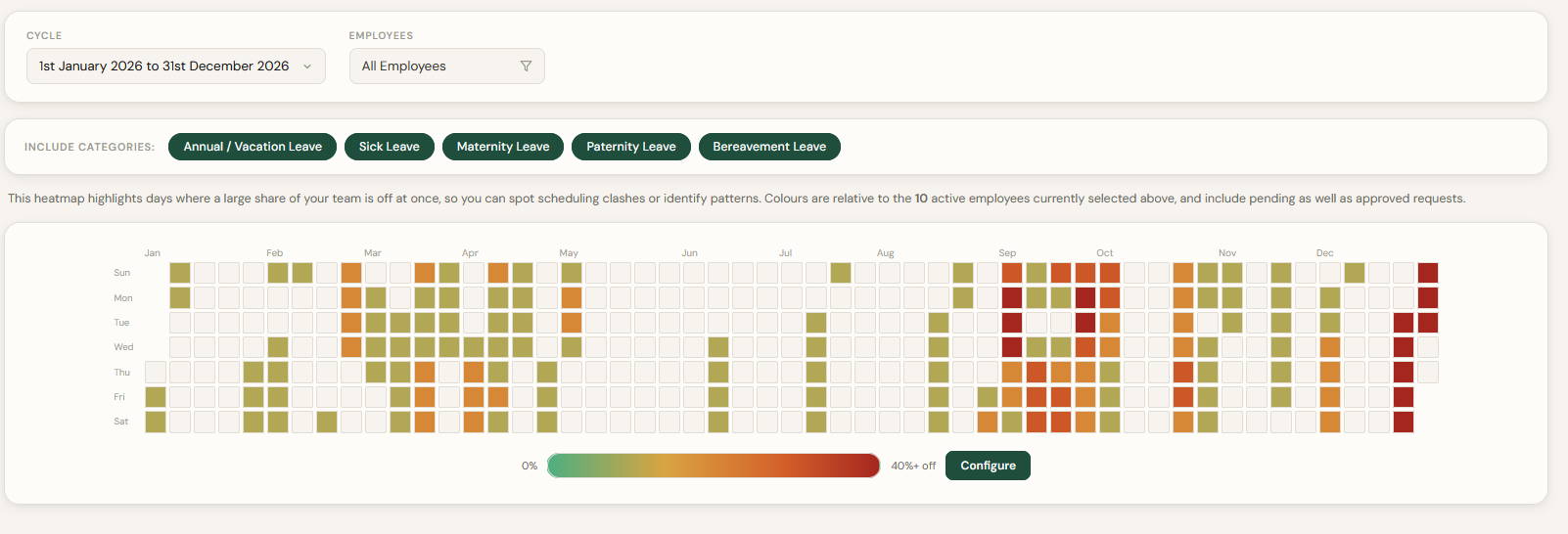
Most staff holiday planners are really just a list: who's off, and when. That's fine until three people in the same small team book the same week off, or half the department disappears the Friday before a bank holiday, and nobody notices until it's too late to do anything about it.
That's the gap our new Heatmap report is built to close. Instead of scrolling through individual leave requests, you get a visual overview of your whole team's annual leave, so busy periods stand out before they turn into a staffing headache.
- See where staff annual leave clusters across a cycle, before it turns into a coverage gap
- Choose which leave policies count, and set your own "busy" threshold (default 30% of the team)
- Available to administrators org-wide, and to managers for their own team
- Works for forward planning and for spotting recurring patterns in past leave
What a Staff Holiday Planner Should Actually Show You
A spreadsheet or basic leave tracker can tell you who has booked time off. What it usually can't tell you is what that looks like together: whether five separate, perfectly reasonable requests add up to a week where a third of your team is away at once.
That's the real job of employee leave management software: not just recording annual leave, but making the impact of that leave visible. Simple Leave's heatmap does this by turning your existing leave data into a calendar view, shaded from green through to red depending on how much of your workforce is off on any given day.
See Busy Annual Leave Periods at a Glance
Open Reports and select Heatmap Report, and you'll see a full leave cycle laid out as a grid, one column per week, one row per day. Days with little or no leave stay clear. As more of your chosen employees are off, the colour shifts through amber and into red once you cross your chosen threshold.
It's a genuinely different way of reading the same information you already have. Rather than working through a list of requests one at a time, you see the shape of your team's availability across the whole cycle in one screen.
Plan Ahead for Staff Holiday Clashes
Heatmaps earn their keep when you're looking forward. You might spot that several employees have booked the same week in August, or that requests are clustering around Christmas or straight after a bank holiday weekend. Those are exactly the kind of staff holiday clashes that are easy to miss request by request but obvious once they're laid out on a team holiday calendar.
Catching this early gives you time to:
- arrange cover before a gap becomes urgent
- schedule project deadlines around who's actually going to be there
- gauge overall team capacity during known busy periods
- make a more informed call on new leave requests that would push a day further into the red
Instead of just knowing who's booked leave, you get a sense of what that leave adds up to for the business.
See Exactly Who Is Away
Once a day catches your eye, hover over it to see a quick summary of who's off. Click through and you get the full breakdown, without needing to leave the report or dig back through individual requests. It's a quick way to move from "this day looks busy" to knowing exactly who's affected and which team they're on.
Choose Which Types of Leave to Include
Not every report needs every category of absence in it. You can choose which leave policies feed into a given heatmap: annual leave only for pure holiday-clash planning, say, or annual leave alongside sick leave and other categories when you want a fuller picture of who's actually available on any given day.
Set Your Own Leave Thresholds
What counts as "busy" varies a lot by organisation. Twenty percent of a ten-person team away at once might be completely fine for one business and a genuine coverage problem for another with tighter shift requirements.
By default, a day turns red once 30% of the employees included in the report are on leave, but you can adjust that to fit your own team size and how much slack you can realistically absorb. Administrators can save their preferred value so it becomes the default for future reports.
Built for Managers, Not Just Admins
Heatmap reports aren't locked to administrators. Managers can run one for themselves and their own direct reports, giving them the same visual planning tool at team level without needing to go through HR every time. Administrators can still run the same report across the whole organisation when they need the bigger picture.
If your team is still working from an Excel-based staff holiday tracker, this is the kind of view that's hard to replicate with conditional formatting once you're past a handful of employees. It only really works when the underlying data updates itself automatically.
Use It to Look Backwards, Not Just Forwards
Heatmaps aren't only for planning ahead. Run the same report over a previous cycle and you can spot recurring patterns: whether Fridays get booked off more than other days, whether leave regularly clusters around the same bank holidays each year, or whether there are periods your business consistently runs with reduced capacity. That's useful the next time you're setting cover policies or reviewing whether your leave cycle rollover needs adjusting.
Frequently Asked Questions
How do I create a heatmap report in Simple Leave?
Go to Reports and select Heatmap Report. Choose a leave cycle, pick which employees to include, and choose which leave policies count towards the report. The calendar fills in automatically from your existing leave data.
Can managers use the heatmap report, or only administrators?
Both. Administrators can run a heatmap across the whole organisation, while managers can run one covering themselves and their direct reports, so team-level planning doesn't have to sit with HR alone.
Does the red threshold affect leave approvals?
No. The threshold only changes when a day is coloured red on the heatmap for visibility. It's a planning view, not an approval rule. Every request still goes through your normal approval workflow.
Can I use a heatmap to look at past leave, not just future planning?
Yes. Run the report over any past leave cycle to see recurring patterns, such as which weeks or bank holidays consistently see the most staff away.
A staff holiday planner is only as useful as what it lets you see. Heatmaps take the leave data you're already collecting in Simple Leave and turn it into something you can act on: catch clashes early, get a real read on team availability, and plan cover before a busy period sneaks up on you.