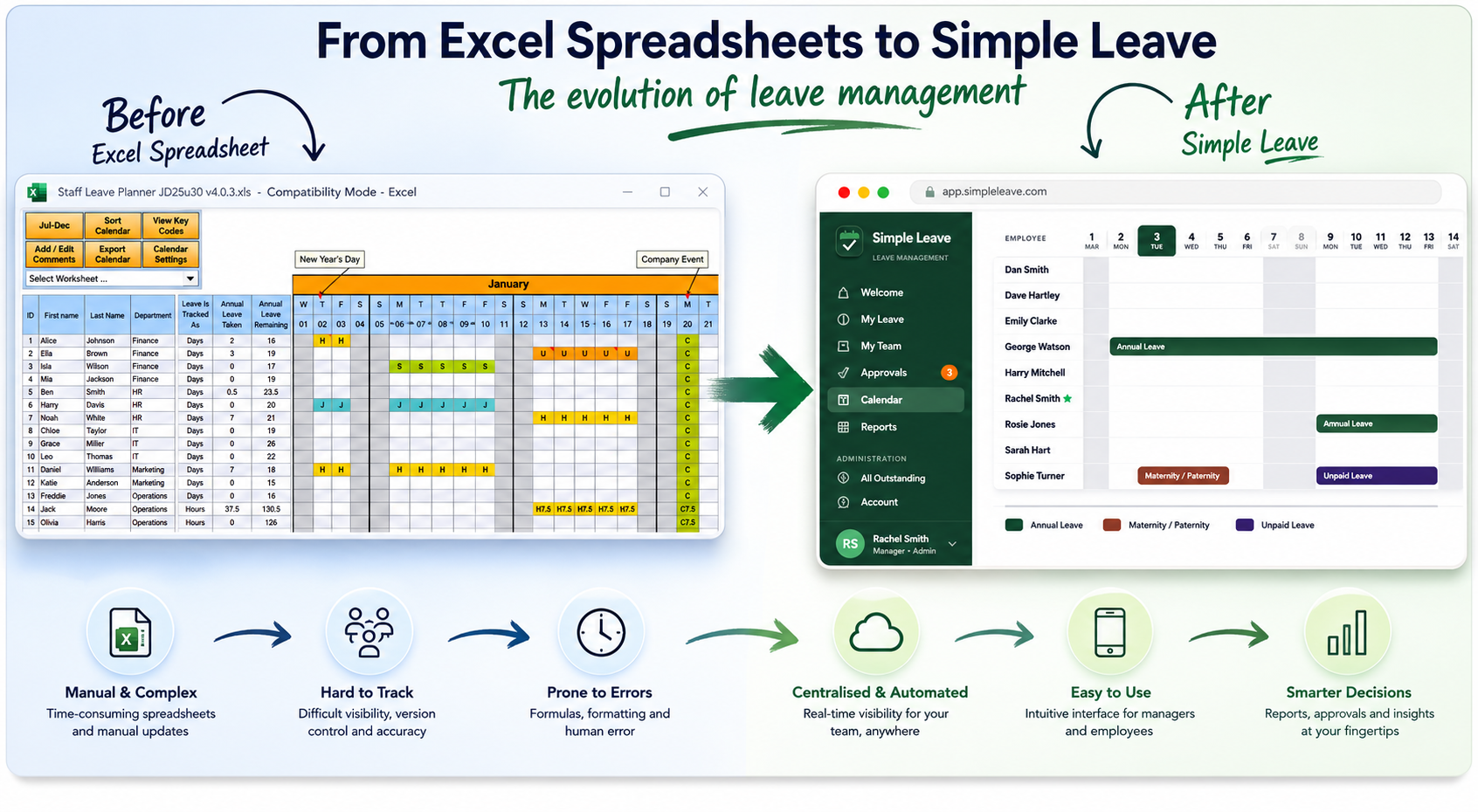
Twenty years ago, dhxsoft started with a simple problem: businesses needed an easy way to track annual leave. Not a clunky HR system. Not a paper form on a noticeboard. Just something clean, reliable, and easy enough that any office manager could pick it up on a Monday morning without a training course.
So we built a spreadsheet.
Not a throwaway template with a few colour-coded cells. We built something properly with formulas that actually worked and self-repaired themselves, complex reporting built in, bank holiday customisations, and enough flexibility that whether you had five employees or fifty, it did the job. We were able to take the Excel experience and expand upon it. People paid for it. They came back for updated versions. They recommended it to other businesses. Over two decades, thousands of teams across the UK have used it to manage their leave, and many still do today.
A Spreadsheet has limits
The spreadsheet genuinely works. For a long time, for a lot of businesses, it was exactly the right tool. People paid for ours because the free alternatives didn't come close: the formulas were half-finished or brittle, the bank holiday lists were wrong or missing, and when something broke, there was nobody to call.
But even a well-built spreadsheet has a ceiling. And over the years, we heard the same frustrations come up again and again.
Sharing becomes a headache. The moment a second manager needed access, or a line manager needs to review their team's leave, you start to hit limitations. Macro-enabled workbooks aren't easily shareable or support multiple people modifying them at the same time. People have to take it in turns to edit. Unique Macro-powered features such as a read-only view to help negate the issues with multiple people needing to view helped - it's ok, but not the experience people expect today.
Data privacy is difficult. A leave tracking system in Excel lacks privacy as spreadsheets are not setup to give different views and permissions based on the user. Sensitive leave codes such as sickness, bereavement leave, discrentionary leave etc are visible to all. Having the ability to hide these and restrict them to managers was a key feature we wanted to solve.
Approval workflows sit outside the system. As you cannot have someone "log in" to a spreadsheet, you also can't design something that manages an ideal leave workflow (make a request -> notify the manager -> review -> log the outcome -> notify the user). Often teams need a separate workflow to manage this which typically involves multiple email chains. All of this adds up to time and efficiency for employees.
Macros are fiddly. A new version of Excel, a slightly different security setting, a rouge virus scanner, an IT department that locks down macro execution all cause friction in being able to use a macro enabled leave tracking spreadsheet. We managed to help customers with these issues, but supporting an environment from afar is a big headache.
What the SaaS Companies Got Wrong
At some point, every major SaaS company worked out that giving away a free annual leave spreadsheet was good for SEO. The internet duly filled up with them.
Most were not built by people who had spent years thinking carefully about UK leave management in Excel. They were marketing assets put together quickly, dressed up nicely, and designed to capture an email address before pointing you towards a paid subscription. The formulas were basic and brittle. Bank holiday lists were either missing or defaulted to US public holidays. Understanding the nuances of organisations - e.g. needing to track both leave entitlement and leave taken, tracking employees on both days and hours, part time workers, having in proper management reports — these were not factored in.
People downloaded them, hit a problem in week two, and had nowhere to turn. And with new legislation from 6 April 2026 requiring UK employers to keep adequate records of workers' annual leave and holiday pay entitlements, the stakes of getting this wrong have risen considerably.
What We Built Instead
The customers who had used our spreadsheet for years started asking a version of the same question: "Is there a better way to do this online?"
Not a huge enterprise system. Just something that handled the leave management admin that spreadsheet could not without losing the simplicity that made it worth using in the first place.
That is what became Simple Leave.
Built for UK businesses, priced competetively for small teams. Pricing starts from a free tier (less than 5 employees), then moves to a paid tier at 60p per active employee per month. Baked in is the leave year logic, bank holiday rules, and flexible setup that twenty years of customer feedback taught us people actually needed. Self-service requests for employees. Proper approval workflows with email notifications. Role-based access so managers only see what they should. And real reporting that tells you what you need to know without requiring pivot table skills.
The same commitment that made people pay for the spreadsheet carries over: someone who genuinely knows the product, ready to help when something is not clear.
Start Where You Are
We are not going to tell you the spreadsheet is dead. It is the right tool for some teams, and we will keep supporting it. But we want to give you the full picture of what is available.
Here are three good options:
- Try Simple Leave free for 30 days. Setup is straightforward, and if you want to bring data across from an existing spreadsheet, our support team can help with that. Learn more about staff leave management with Simple Leave.
- Use a spreadsheet that has been properly built and is actively supported. If you prefer to stay in Excel for now, our dhxsoft staff leave planners have been maintained and improved for over two decades. Find them at www.dhxsoft.com.
- Start with a free planner, at least one that is well designed. If you are at the very beginning and just need something to get through the next few months, our free 2027 leave tracker is built to help you get off the ground — no missing formulas, correct UK bank holidays included, and a great visual design.
Whatever you choose, the goal is the same: your team should always know where they stand with their leave, and managing that process should not eat into your working week.