Free Excel Leave Planner 2027
Get your team's 2027 leave year organised before it starts. Track holiday, annual leave and absences for up to 100 employees with this free Excel planner. UK bank holidays are pre-filled and the calendar is customisable to fit your company's specific dates. No sign-up needed — just download the .xlsx file and start planning.
.xlsx file · Microsoft Excel · Free · No support provided
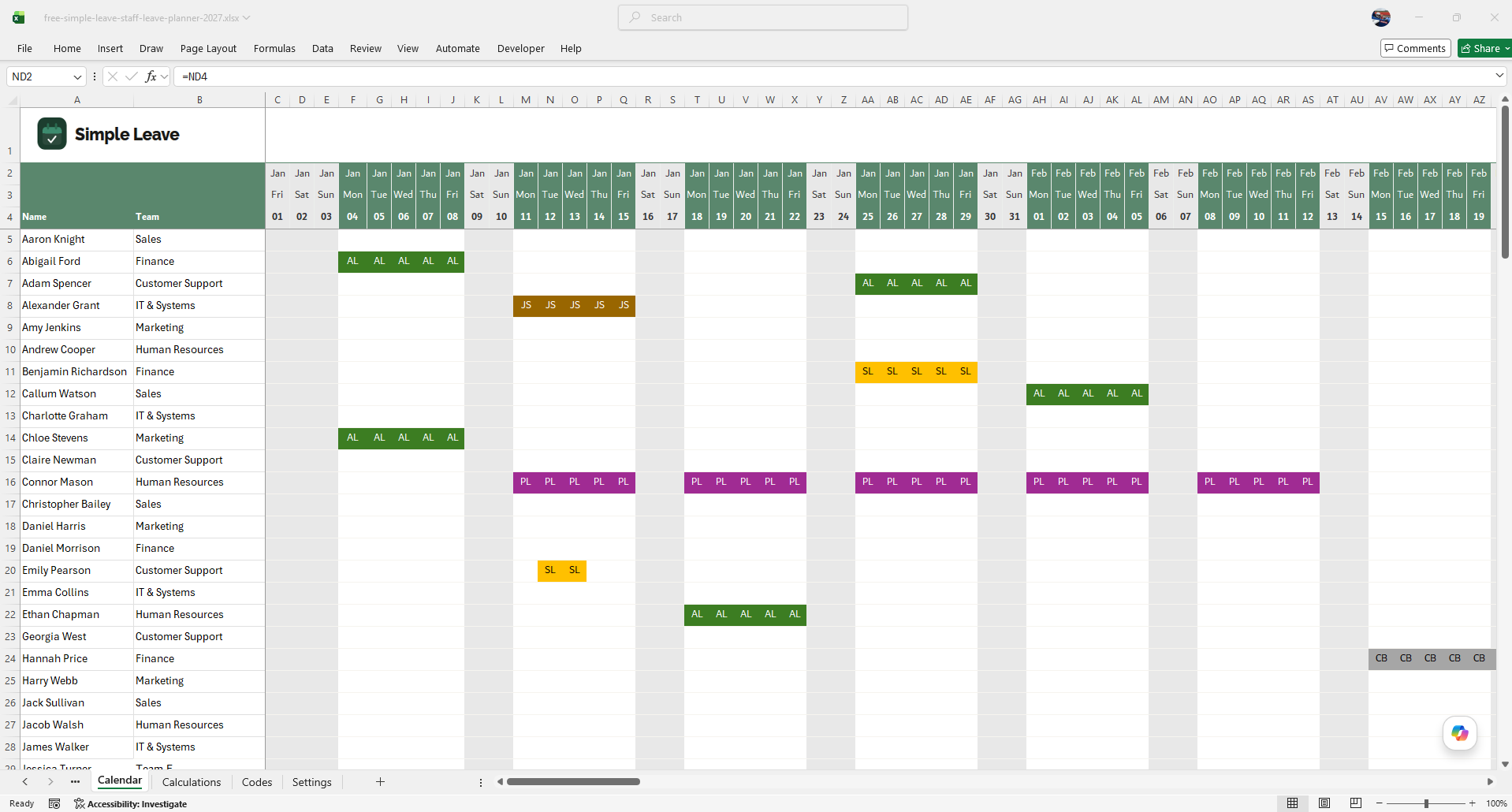
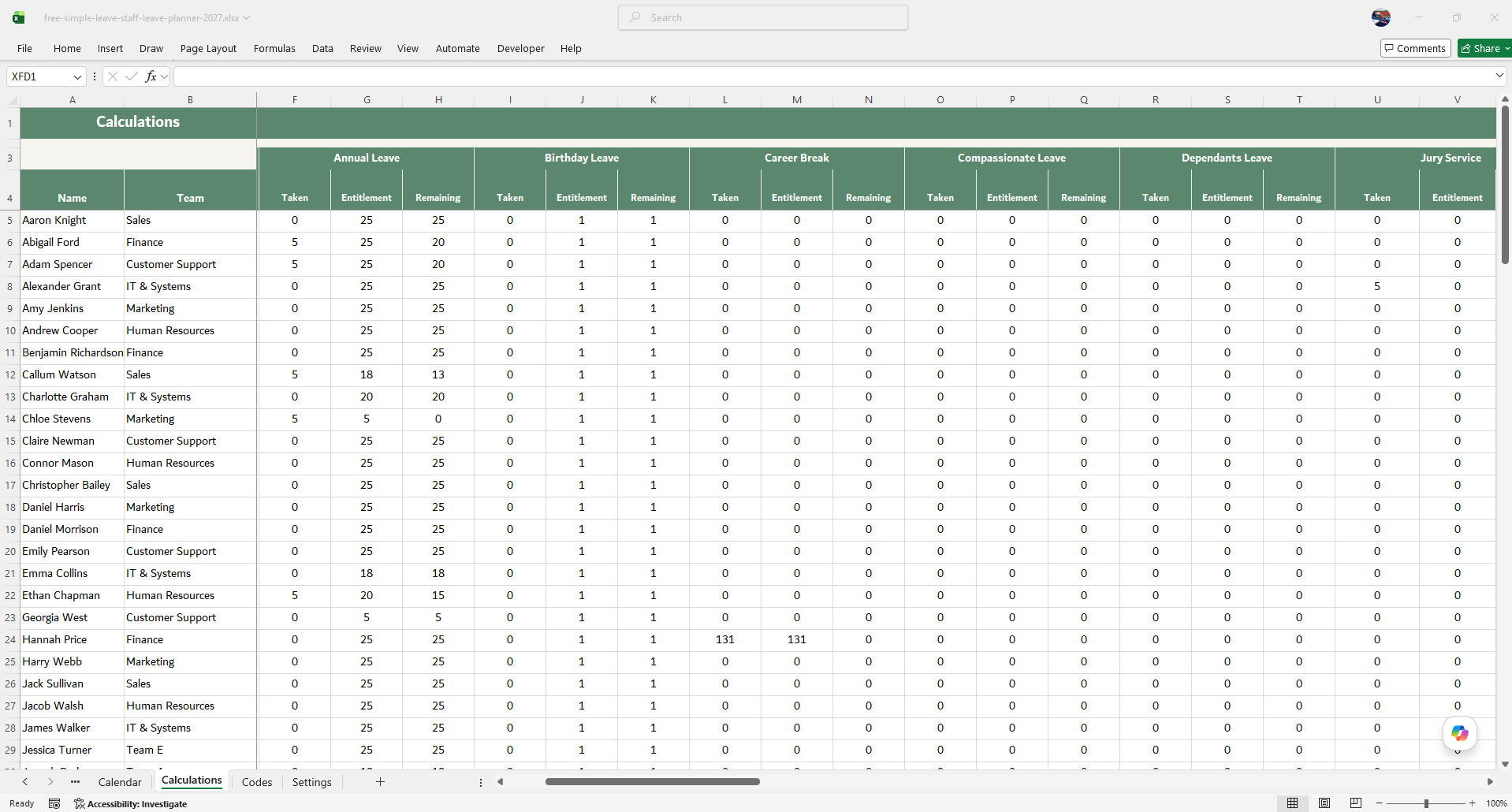
What's included in the free 2027 excel planner
Plan your whole 2027 leave year on a colour-coded 12 month calendar. Each leave type has its own colour so you can see who's off and when at a glance. Bank holidays for 2027 are already marked, and half-days or other fractions are handled through the leave code values with no formula editing required.
Each employee gets their own row showing their 2027 entitlement, days taken so far, and remaining balance - recalculated automatically as leave is entered. Any carry-over from 2026 can be added directly to the entitlement figure.
Every UK statutory leave category is built in from day one - Annual Leave, Sick Leave, Maternity Leave, Paternity Leave, Adoption Leave, Shared Parental Leave, Compassionate Leave, Parental Bereavement Leave, TOIL and more, each with its own colour. You can also customise the codes with your own company-specific ones
2027 UK bank holidays (England & Wales)
All 8 public holidays are pre-filled in the planner. Scotland has 9 bank holidays and Northern Ireland has 10 - add any additional dates manually on the Calendar sheet.
| Date | Day | Bank holiday | Notes |
|---|---|---|---|
| 1 January 2027 | Friday | New Year's Day | 3-day start to the year |
| 26 March 2027 | Friday | Good Friday | 4-day Easter break, no leave needed |
| 29 March 2027 | Monday | Easter Monday | 4-day Easter break, no leave needed |
| 3 May 2027 | Monday | Early May Bank Holiday | Take Fri 30 Apr for a 4-day weekend |
| 31 May 2027 | Monday | Spring Bank Holiday | Take Fri 28 May for a 4-day weekend |
| 30 August 2027 | Monday | Summer Bank Holiday | Take Fri 27 Aug for a 4-day weekend |
| 27 December 2027 | Monday | Christmas Day (substitute) | 25 Dec falls on a Saturday |
| 28 December 2027 | Tuesday | Boxing Day (substitute) | 26 Dec falls on a Sunday |
Making the most of 2027 bank holidays
2027 has some excellent opportunities to stretch bank holidays into longer breaks - including one where 3 days' leave buys 10 days off. Planning these in your planner early helps avoid clashes when the whole team wants the same days.
Sat 25 Dec 2027 – Mon 3 Jan 2028
Christmas and Boxing Day both fall on the weekend, so substitutes run Mon 27 and Tue 28 Dec. Take just 3 days' leave (Wed 29, Thu 30, Fri 31 Dec) and the New Year substitute on Mon 3 Jan 2028 extends the break to 10 consecutive days off.
Fri 26 March – Mon 29 March
Good Friday and Easter Monday bookend the weekend. A free 4-day break - no annual leave needed at all.
Fri 30 April – Mon 3 May
Take Friday 30 April to turn the Early May Bank Holiday into a 4-day weekend.
Fri 28 May – Mon 31 May
Take Friday 28 May for a 4-day weekend. Popular with families during school half-term week.
Fri 27 August – Mon 30 August
Take Friday 27 August for a 4-day weekend - the last long weekend before the Christmas break.
Download your free 2027 planner
No sign-up. No email address. A free, ready-to-use Excel spreadsheet
with 2027 UK bank holidays already filled in.
This template is provided free of charge. No technical support is offered or implied.
Getting started with the Leave Planner
Click the download button above. Save the spreadsheet and open it in Microsoft Excel (unfortunately Mac Excel does not work with the formulas we have used). There's no macros so you can just start using it.
Enter each team member's name onto the rows on the Calendar sheet. Setup leave entitlements on the Calculations sheet to configure leave entitlements per employee. The Codes and Settings sheets let you configure custom leave types, fractional day values, and configure other options.
Enter leave codes on the calendar. Balances update automatically and the yearly summary gives you a full picture at a glance. Conditional formatting rules ensure codes are coloured correctly based on the type of leave.
- 2027 England & Wales bank holidays pre-filled - 8 public holidays already entered in the calendar
- Statutory 5.6 weeks minimum supported - set any entitlement amount to match your policy
- Pro-rata for part-time workers - enter any decimal entitlement (e.g. 22.4 days for a 4-day week)
- Flexible fractional days - half days and other fractions are controlled by the value assigned to each code on the Codes sheet. No complicated IF statements - the formulas are kept simple so anyone can use them
When you need more than a spreadsheet
We love spreadsheets and they're perfect to get you started with tracking staff leave. But many customers soon outgrow them as teams get bigger and more remote. That's why we built Simple Leave - to give growing teams a better way to manage leave without the hassle of spreadsheets. If you find yourself needing a simple approval system, detailed reporting, or a shared calendar that everyone can access across multiple devices then give Simple Leave a try. It's free for teams of up to 5 people so you can get started with your 2027 data and see if it's a good fit for your team before the year starts.
- Staff book leave themselves — no chasing
- Approvals done in seconds
- Shared calendar, always up to date
- Holiday balances accurate at all times
- Automatic confirmation emails
- Free for teams of up to 5 people
Free for up to 5 employees. No credit card required.