
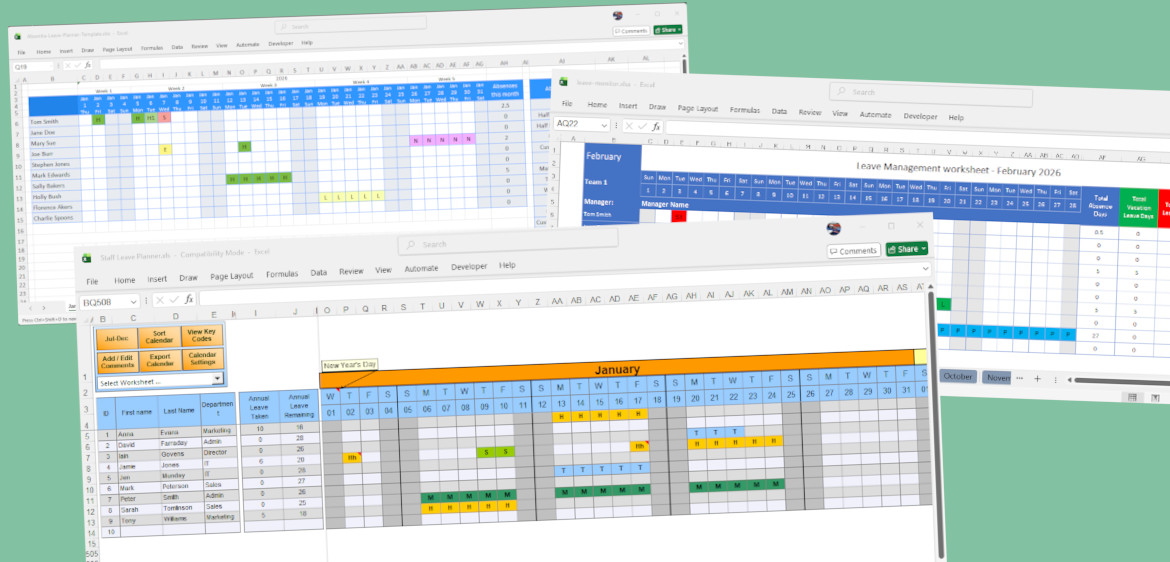

Summary of our findings
| Criteria | dhxsoft | Absentia | Trump Excel | Leave-Monitor | ScheduleLeave | Final Recommendation |
|---|---|---|---|---|---|---|
| Ease of Setup | ⭐⭐⭐⭐ | ⭐⭐⭐ | ⭐⭐ | ⭐⭐⭐ | ⭐⭐ | dhxsoft stands out for flexible downloads, automated setup, and strong year-to-year continuity. Absentia is second but more limited once downloaded. |
| Overall Functionality | ⭐⭐⭐⭐⭐ | ⭐⭐ | ⭐ | ⭐⭐ | ⭐ | dhxsoft has the most comprehensive feature sets. Other providers meet basic needs but will require extensive customisation. |
| Formula Complexity | ⭐⭐⭐⭐⭐ | ⭐⭐⭐ | ⭐ | ⭐⭐ | ⭐ | dhxsoft is the only planner with self-healing formulas, multi-code days, and combined hours and days support. Absentia ranks second but at higher maintenance cost. |
| Reporting and Analytics | ⭐⭐⭐⭐ | ⭐⭐ | ⭐ | ⭐⭐ | ⭐ | dhxsoft provides meaningful reporting out of the box. Leave-Monitor is second with cleaner summaries but limited analytical depth. |
| Support & Documentation | ⭐⭐⭐⭐⭐ | ⭐⭐ | ⭐ | ⭐ | ⭐ | dhxsoft is the clear winner with included support and strong documentation. Others rely heavily on self-support. |
| Cost of ownership | ⭐⭐⭐⭐ | ⭐⭐ | ⭐ | ⭐⭐ | ⭐ | dhxsoft has the lowest long-term time cost despite upfront pricing. Absentia and Leave-Monitor appear cheaper but incur ongoing maintenance effort. |
| Visual Clarity and UI Experience | ⭐⭐⭐⭐ | ⭐⭐⭐ | ⭐ | ⭐⭐ | ⭐ | dhxsoft offers the best balance of usability and protection. Absentia is visually clean but functionally limited. |
Our Overall Recommendation
🏆 Best Overall Excel Leave Planner: dhxsoft Staff Leave Planner
Consistently top-rated across setup, formulas, reporting, support, and long-term cost. It is the only planner that scales cleanly as leave policies become more complex.
There is a cost to the dhxsoft planners if you are purchasing for the year ahead. Generally, if there are 6 months of less in a leave-planner year then these planners are available free of charge.
For more information visit: dhxsoft.com
🥈 Second Best (for very simple use cases): Absentia
Strong visual design and easy initial setup, but quickly becomes limiting and maintenance-heavy.
In depth: Ease of Setup
The best leave trackers should get you up and running in minutes, not hours. A truly easy-to-use planner means downloading a template or file and immediately being able to access it without complicated installation processes or technical prerequisites. But ease of setup doesn’t stop at the download - it extends to how quickly you can populate your data and tailor the system to your needs.
| Planner | Rating | Comments |
|---|---|---|
| dhxsoft Staff Leave Planner | ⭐⭐⭐⭐ | dhxsoft offers one of the most flexible setup experiences available for Excel-based leave planners. The website lets you download planners tailored to different calendar years (e.g Jan-Dec, Apr-Mar, etc) and employee size up to 500. While Excel macro security settings need to be enabled during first use, clear documentation makes this process manageable even for non-technical users. Once opened, setup is streamlined thanks to automated forms, built-in bank holidays for multiple countries, and simple configuration screens for leave categories and sub-categories. Year-to-year transitions are particularly strong, with data and configuration automatically imported from previous planners, removing the need for re-setup each year. |
| Absentia | ⭐⭐⭐ | Absentia have a fantastic web interface to initially generate your planner. However, once there the tracker functionality is limited. You’ll have to add in your own bank holidays. Updating the colours of the leave codes was not clear, neither is the process for adding new codes and updating the formulas. |
| Trump Excel | ⭐⭐ | Downloading the template is simple enough and can be customised with a different starting month. Like dhxsoft, you will need to enable macros which may be fiddly without clear instructions. The number of employees and codes on the planner are limited. Does have support for bank holidays |
| Leave-Monitor | ⭐⭐⭐ | Simple to download and setup. Like Absentia, once there the tracker functionality is limited. No in-built support for bank holiday dates. Setup for a Jan-Dec year only. Adding more codes and employees, updating formulas all need to be performed manually and with care. |
| ScheduleLeave | ⭐⭐ | Straight forward download. Difficult to customise the limited number of codes - formulas need to be added and carefully tested. Supports bank holidays. |
In depth: Overall functionality
Overall functionality looks at how well each Excel leave planner works as a complete system rather than a collection of individual features. In this section, we assess whether the planner can comfortably handle real-world scenarios such as multiple leave types, different working patterns, growing team sizes, and evolving policies without becoming fragile or difficult to maintain. A strong planner should feel cohesive, resilient, and scalable, supporting day-to-day use while still holding up as organisational complexity increases.
| Planner | Rating | Comments |
|---|---|---|
| dhxsoft Staff Leave Planner | ⭐⭐⭐⭐⭐ | dhxsoft offers the most comprehensive set of features across all the planners tested. It allows you to easily extend the categories, supports sub codes, days and hours tracking, multiple codes in cells, at-a-glance reporting, in depth reporting, support for time in lieu. It has security views - non admins can have a read only copy generated as well as support for national holidays across multiple countries. |
| Absentia | ⭐⭐ | Works well for simple scenarios and looks polished, but functionality quickly plateaus. Manual formula maintenance, limited reporting depth, and lack of hybrid hours/days support make it less suitable as teams or policies grow. |
| Trump Excel | ⭐ | Functionality is very limited and difficult to extend. Complex formulas, unclear customisation paths, no error recovery, and minimal reporting mean it struggles to support anything beyond very basic use cases. |
| Leave-Monitor | ⭐⭐ | Provides a clean and usable baseline for simple tracking, but lacks flexibility. Manual updates are required for scaling, formulas are fragile, and reporting is basic, making it unsuitable for growing or complex organisations. |
| ScheduleLeave | ⭐ | Extremely limited overall functionality. Few leave codes, no hourly tracking, fragile formulas, and heavy manual setup make it difficult to adapt or rely on in real-world scenarios. |
In depth: Formula Complexity
Excel leave planners live or die by their formulas, so we assess whether they feel robust without being fragile. This includes how easy it is to add or change leave codes, whether formatting and formulas are protected or require manual handling, and how well the planner recovers from common mistakes like dragging cells or overwriting formulas. We also look at flexibility: whether multiple leave codes can be recorded on the same day and whether both full-day and hourly leave tracking are supported without awkward workarounds, as these features are essential for planners that need to scale with more complex leave policies.
| Planner | Rating | Comments |
|---|---|---|
| dhxsoft Staff Leave Planner | ⭐⭐⭐⭐⭐ | The dhxsoft planner performs strongly in this area thanks to it’s UI making this simple. The planner supports categories and sub-codes within them. Adding leave codes is simple, and the formulas / formatting updates itself. It is the only planner tested that allows for multiple codes on the same day e.g. half-day of leave in the morning, half-day of unpaid leave in the afternoon. It supports both hours and days. The formulas are self-healing, so should you unwittingly drag a cell into the wrong area it won’t break the calculations. It was also the only planner that allowed you to have codes in lieu that increase allowances. |
| Absentia | ⭐⭐⭐ | You’ll have to be comfortable manually editing the formulas across all 12 calendar sheets which will take time. No support for multiple leave types in a single day. They do offer an Hours version of the template, however it’s not not hybrid (i.e. supports days and hours simulataneously). No automatic formala repair. The cost of modifying the template is it’s biggest weakness and where most time will be sunk |
| Trump Excel | ⭐ | It’s unclear how to extend the leave codes. Formulas appear complicated, and would all need manually updating. No formula repairs to protect from errors. Only supports a single leave entry per cell. No support for hourly tracking. |
| Leave-Monitor | ⭐⭐ | To extend the formulas you’ll need to update them in multiple places across multiple sheets, so it suffers from the same limitations as others. Only supports single leave entries and doesn’t support hourly tracking. Formulas are not repaired. |
| ScheduleLeave | ⭐ | Has the most limited set of inbuilt leave codes (5) so immediately you will need to start customising. It wasn’t easy to add new codes or know where to update the formulas / formatting. Like others, only supports single code entry, no formula repair, no support for hourly tracking. |
In depth: Reporting and Analytics
Reporting and analytics determine how useful a leave planner is beyond simple day-to-day tracking. In this section, we assess whether the planner provides clear, meaningful reports out of the box, such as leave balances, absence summaries, and team or departmental views, without requiring users to build pivot tables or complex formulas themselves. We also look at how flexible the reporting is: whether it updates automatically as data changes, supports different leave types and date ranges, and presents information in a way that is easy to share with managers or stakeholders. Strong reporting turns a leave planner from a basic tracker into a reliable management tool.
| Planner | Rating | Comments |
|---|---|---|
| dhxsoft Staff Leave Planner | ⭐⭐⭐⭐ | The dhxsoft planner has in-built reports that can present a variety of different views depending on your needs. Summary balances are presented in a couple of places on the planner (the calendar and the employee sheet). The in-depth reports are macro based, there is an option to run them in batches and save to your computer but note that these can take a couple of minutes to run for larger (30+) organisations. |
| Absentia | ⭐⭐ | This planner has a “totals” sheet and a basic “absences this month” column on the calendar. However, it’s not suitable for scale and you will need to build your own MI on top. For example, the total’s sheet doesn’t present the data in a clear way where it’s broken down by category. |
| Trump Excel | ⭐ | There is just a “Leave Breakup” column on the spreadsheet which lacks detail and isn’t clear to understand. You will need to build your own MI on top, but that will be difficult due to the complexity of the formulas. |
| Leave-Monitor | ⭐⭐ | Cleanly presented breakdowns on both the calendar and Yearly Total sheet. You will still need to build out more in-depth MI on top of it. |
| ScheduleLeave | ⭐ | “Employee Overview” sheet presents the information in an acceptable way. As the planner doesn’t support sub-codes there is no further information to break down - so it’s functional but lacking depth as a result of the overall functionality. |
In depth: Support & Documentation
Good support and clear documentation are essential, especially for Excel leave planners that rely on advanced features like formulas or macros. In this section, we assess whether users are given clear, step-by-step guidance to get started, resolve common issues, and confidently use the planner’s full functionality. We also consider the availability and quality of ongoing support, including troubleshooting resources, FAQs, and direct assistance, as strong documentation and responsive support can make the difference between a smooth experience and a frustrating one.
| Planner | Rating | Comments |
|---|---|---|
| dhxsoft Staff Leave Planner | ⭐⭐⭐⭐⭐ | dhxsoft support is included with the planner, even the free versions they give away. There is also extensive documentation on their website which supports using the planner. |
| Absentia | ⭐⭐ | There’s no support formally offered and general guidance / notes are provided. The comments thread on the download page does indicate they are providing some guidance and updates. |
| Trump Excel | ⭐ | There’s no support formally offered but general guidance / notes are provided. There are lots of unanswered user comments on the download page, so the developer does not appear to be supporting this. |
| Leave-Monitor | ⭐ | Brief notes are provided on the website, but otherwise you will need to support this yourself. |
| ScheduleLeave | ⭐ | No support or documentation offered. |
In depth: Cost of ownership
Cost of ownership isn’t just about whether an Excel leave planner is free to download. In this section, we focus on the time cost of ownership: how much ongoing effort is required to maintain the planner, fix errors, update formulas, or support users when things go wrong. A planner may have no upfront price, but if it regularly requires manual intervention, troubleshooting, or rework, the true cost quickly shows up in lost time and productivity.
| Planner | Rating | Comments |
|---|---|---|
| dhxsoft Staff Leave Planner | ⭐⭐⭐⭐ | The planner and support provided from dhxsoft means that you will not be spending time troubleshooting, updating formulas or extending functionality of the planner. Whilst there is an upfront cost, this quickly pays for itself with improved productivity and user experience |
| Absentia | ⭐⭐ | Whilst the template is visually appealing, the most time will be spent extending and fixing formulas, and expanding the MI capabilities. With no dedicated support, businesses could find themselves in a difficult spot should problems arise. Teams will soon outgrow the functionality provided. |
| Trump Excel | ⭐ | The lack of support and the complexity of this planner means this will be a time-sink to get it to a level of workability for your business. The lack of support and need to know VBA to support macros should be strong considerations before adopting. |
| Leave-Monitor | ⭐⭐ | The same limitations apply to leave-monitor as they do Absentia. Be careful before adopting due to hidden costs of maintenance and unsupported custom updates you’ll need to make. Companies will soon outgrow the functionality provided. |
| ScheduleLeave | ⭐ | There’s too much upfront work to make this a viable option. |
In depth: Visual Clarity and UI Experience
Visual clarity plays a major role in how usable an Excel leave planner is day to day. In this section, we look at whether the layout is clean and intuitive, with clear visual cues that make it easy to understand who is off and when at a glance. We assess the use of colour, spacing, and consistent formatting, as well as whether the interface relies on cluttered worksheets or provides guided views and forms that reduce cognitive load. A strong UI should help users avoid mistakes, navigate quickly, and feel confident using the planner without needing constant reference to instructions.
| Planner | Rating | Comments |
|---|---|---|
| dhxsoft Staff Leave Planner | ⭐⭐⭐⭐ | The planner provides buttons and dropdowns to navigate the spreadsheet. Use of forms allows for confident changes to settings. The formatting of the planner is clean and self-healing. Highlights include right-clicking cells to choose leave codes. The calendar is laid out across two worksheets, contain 6 months at a time on each. |
| Absentia | ⭐⭐⭐ | Great, simple colour pallete and layout. Fits well onto the screen. The calendar is spread out amongst 12 months. |
| Trump Excel | ⭐ | Macro based navigation of the calendar feels clunky. Colour palette feels dated. No frills approach. |
| Leave-Monitor | ⭐⭐ | Great UI layout, has taken a good approach to supporting different teams. However changing that layout will be fiddly if you have more than 3 teams of 10 in each. The Calendar is laid out across 12 sheets. |
| ScheduleLeave | ⭐ | The cell sizing is way too large to be functional, so be prepared to get in there and fix it yourself. Otherwise it’s very bare-bones. The calendar is on one page, but very wide so expect lots of scrolling. |
